
Faster where it
actually hurts.
A free Minecraft server jar and proxy. Drop one file in, keep every plugin, and hold your tick rate when the mobs pile up.
Measured, not estimated
3.2× the headroom
under a thousand mobs.
Tick time is what decides whether your server feels smooth. Lower is better. Both servers ran the same world, the same seed and the same JVM flags on one machine.
300 entities
1,000 entities
Minecraft 1.21.4, average tick time over 400 sampled ticks, Apple M3 Pro, 4GB heap. One machine, so treat it as an indication rather than a promise — your hardware will differ. We also tested 26.2 and the runs varied too much to publish a number, which we say so on thebenchmarks page along with the raw output.

Two things we make
Most people only need the first one.
AtlasSpigot
26.2A server jar
This is the file your server runs on. Swap it for the one you have now and everything gets a bit faster — same worlds, same plugins, same settings.
What you get
We test everything
Before we turn a setting on, we check it properly. If it could break your world, we leave it off.
Your plugins still work
Anything made for Paper, Purpur or Spigot runs here. One setting in the tuned config switches off hopper events for speed — if you use a shop or sorting plugin, turn that one back on.
Old versions too
16 versions, from 1.20 all the way to 26.2. Every one gets the same care.
See everything we changed on the tuning page.
Pick your version
Newer versions are built on Leaf. Older ones use Purpur, going back to 1.20.

Used for the newest Minecraft versions.
- 26.2
- 26.1.2
- 1.21.11
- 1.21.8
- 1.21.7
- 1.21.6
- 1.21.5
- 1.21.4

Used for older versions, going back to 1.20.
- 1.21.3
- 1.21.1
- 1.21
- 1.20.6
- 1.20.4
- 1.20.2
- 1.20.1
- 1.20
ready to download not made yet
Common questions
Do my plugins still work?+
Yes — the jar runs anything built for Paper or Spigot. The one thing to know: our tuned config turns off hopper move events, because that is the single biggest speed win available. Plugins that watch hoppers, like shops and item sorters, need it switched back on. Set hopper.disable-move-event to false in paper-world-defaults.yml and they work again.
Is AtlasSpigot free?+
Yes, completely. It's free to download, and the source is public under the same licenses as the projects it's built on.
How much faster is it than Paper?+
On Minecraft 1.21.4 we measured it generating new chunks 9.6% faster than stock Paper. That is the one number we can stand behind. We also tested 26.2 and the result was too noisy to call — it looked faster on average, but the test machine varied more between runs than the two servers differed from each other, so we are not claiming a figure for it. The hardware, settings and raw results for both are on the benchmarks page.
Which Minecraft versions are supported?+
Minecraft 1.20 through 26.2. Each version is its own build, so you download the one matching your server.
How do I install it?+
Swap your current server jar for the AtlasSpigot one and start the server as normal. Your worlds, plugins and settings stay where they are.
Did you build this from scratch?+
No. We take Leaf or Purpur, tune the settings, test them, and put our name on it.
Is it safe for my server?+
We test every change before turning it on, and we list the ones we skipped and why. Keep a backup anyway — that's good advice for any server software.
Who's running it
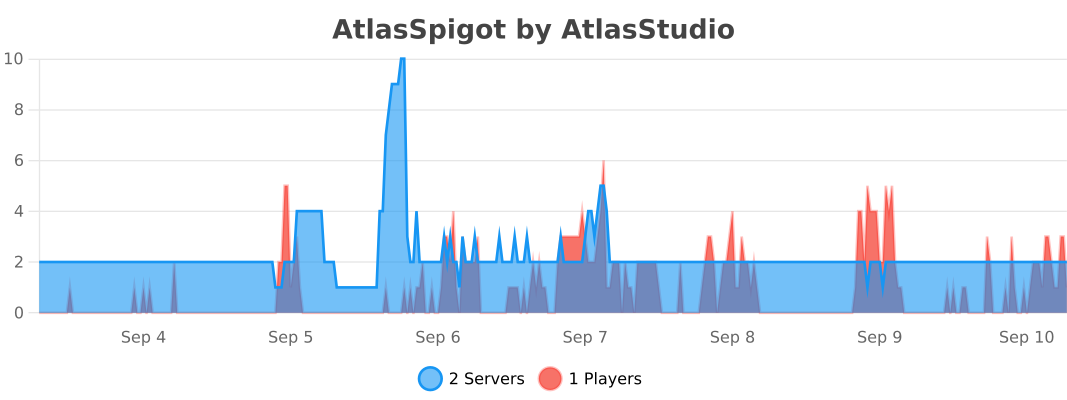
Real servers, counted by bStats. The graph below is live — it's whatever the number actually is right now, not a number we typed in.
Running AtlasSpigot and want your server listed here?Open an issuewith your name and logo.
